
This article will walk you through the steps to reset your password.
Please ensure you are on our UK website fool.co.uk before you go any further.
Look in the top right-hand corner of the screen. You will see a black bar that runs along the top of the screen, and all the way to the right it will either say 'Member Login' or 'Logout'.
If you see 'Logout' - then you are already logged in. You can navigate to your service by clicking 'Your Account and Services' and selecting your service from the drop-down menu.
If you see ‘Login’ and you do not remember your login details, then follow the directions below to reset your password.
Click the 'Member Login' button
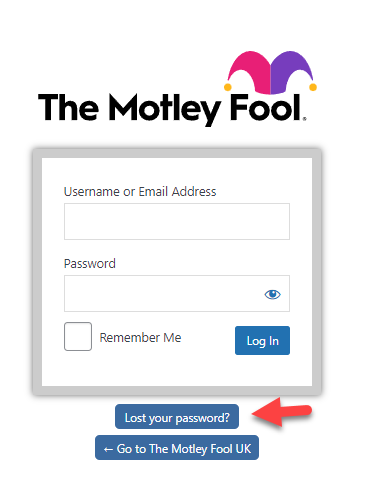
Click on Lost your Password? higlighted in blue
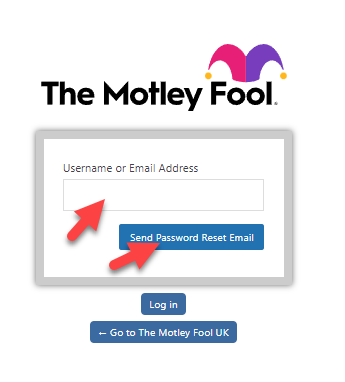
Enter your username or registered email address and click Send Password Reset Email
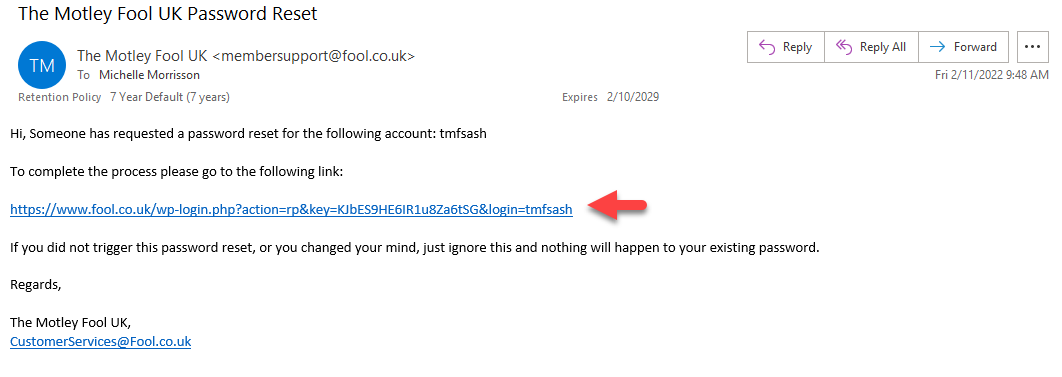
Open up your email and you should receive the following automated email.
(Note: If you have not received an email please check your junk/spam folder)
Click on the link in the email - example below
 Enter your New Password, click Save Password and then click Log in.
A strong password should be at least 9 characters long and include both upper and lower case letters, numbers, and symbols like ! " ? $ % ^ &).

After successfully logging in, you can then navigate to your services page by clicking on 'Your Account and Services' at the top right of your screen and selecting your service from the drop-down menu.
Still can't find what you're looking for?
Email us at membersupport@fool.co.uk and we'll get back to you.